
Sanders connects to your MetaTrader 5 and mirrors every GTK signal in seconds. Broker-aware, risk-controlled, zero manual work.
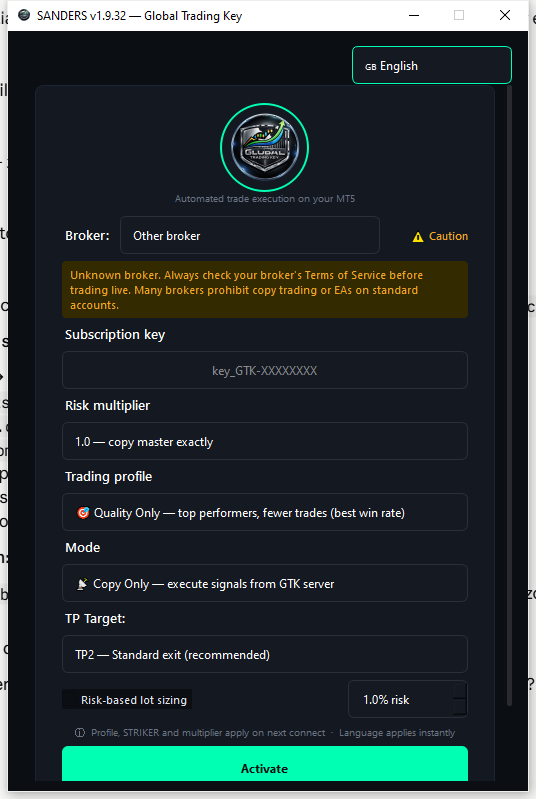
Open Sanders, enter your GTK key, pick your broker and profile — then click Activate. Sanders handles everything from there: authentication, signal reception, lot sizing, smart exit, and daily risk limits.
No MT5 Expert Advisor required. Sanders runs as a standalone Windows app alongside your MT5 terminal.
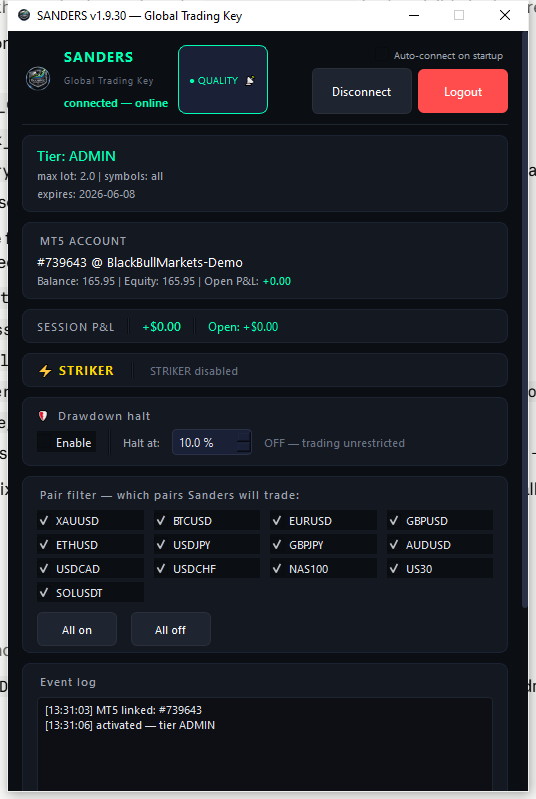
Watch every trade fire, track your floating P&L, and take one-tap risk actions — all from the Sanders dashboard while MT5 runs in the background.
Subscribe on the GTK website and receive your personal GTK-XXXXX license key by email.
Download Sanders.exe for Windows. No installation required — just run it alongside your MT5 terminal.
Enter your key, select your broker, choose a Smart Exit profile and your TP target. Sanders remembers everything.
Hit Activate. Sanders connects to the GTK server and copies every signal straight to your MT5 — hands free.
Every feature was designed around one goal: protect your capital while copying without compromise.
Automatically adjusts poll rates, magic numbers, and order comments per broker. Stays clean and undetected across Exness, IC Markets, Pepperstone, PUPrime and 7 more.
Choose TP1 (tight scalp exit) through TP4 (runner) per session. Sanders uses your chosen level as the exit — independently from whatever the master trader targets.
Set your % risk per trade. Sanders calculates lot size from SL distance × your live balance — not a flat multiplier that ignores account size. Works across all pairs.
Five profiles: Safe Pilot, Balanced, Quality Hunter, Fast Layer, Runner. Each applies a different trailing/partial-close strategy after TP1 is hit — fully automatic.
Optional breakout entries between copy signals. Tick-speed impulse detection on up to 10 pairs, configurable risk, and broker-rate-limited to avoid API flags.
Sanders checks for updates on every startup. New versions install in one click — no re-download, no re-configuration. Your settings carry over automatically.
Sanders reads your MT5 company name and automatically selects the right broker profile. Exness, BlackBull, IC Markets, Pepperstone and 8 more — zero config needed.
Header shows when the last GTK signal arrived — green under 15 min, orange up to 1h, red after 1h. Know at a glance if the signal feed is active.
Pick the profile that matches your style. You can change it between sessions without losing open positions.
| Profile | Behaviour after TP1 | Best for |
|---|---|---|
| Safe Pilot | Close 50% at TP1, move SL to no-loss | Conservative accounts, small balance |
| Balanced | Trailing stop 1.5× ATR after TP1 | Default — works on most setups |
| Quality Hunter | Trailing stop 2× ATR after TP2, no-loss guard | Higher WR signals, let winners run |
| Fast Layer | No extras, max 3 positions per pair | Scalp-heavy, high-frequency signals |
| Runner | 25% at TP1, 25% at TP2, trail the rest | Trend following, big R-multiple targets |
Sanders has built-in profiles for 11 brokers. Safe brokers auto-fill conservative settings. Caution brokers show a warning. Prohibited brokers block STRIKER automatically.
| Broker | Status | Recommended profile |
|---|---|---|
| BlackBull Markets | Safe | balanced / quality_hunter |
| Exness | Safe | balanced / quality_hunter |
| IC Markets | Safe | balanced |
| Pepperstone | Safe | balanced / runner |
| Tickmill | Safe | fast_layer / balanced |
| FP Markets | Safe | balanced |
| XM | Caution | safe_pilot (no STRIKER) |
| PUPrime | Prohibited | Not supported — ToS violation |
| Other | Manual | Check your broker ToS first |
Sanders is free to download. You need an active GTK subscription key to connect. Plans start at $50/month.